Clean lead intake from messy sources
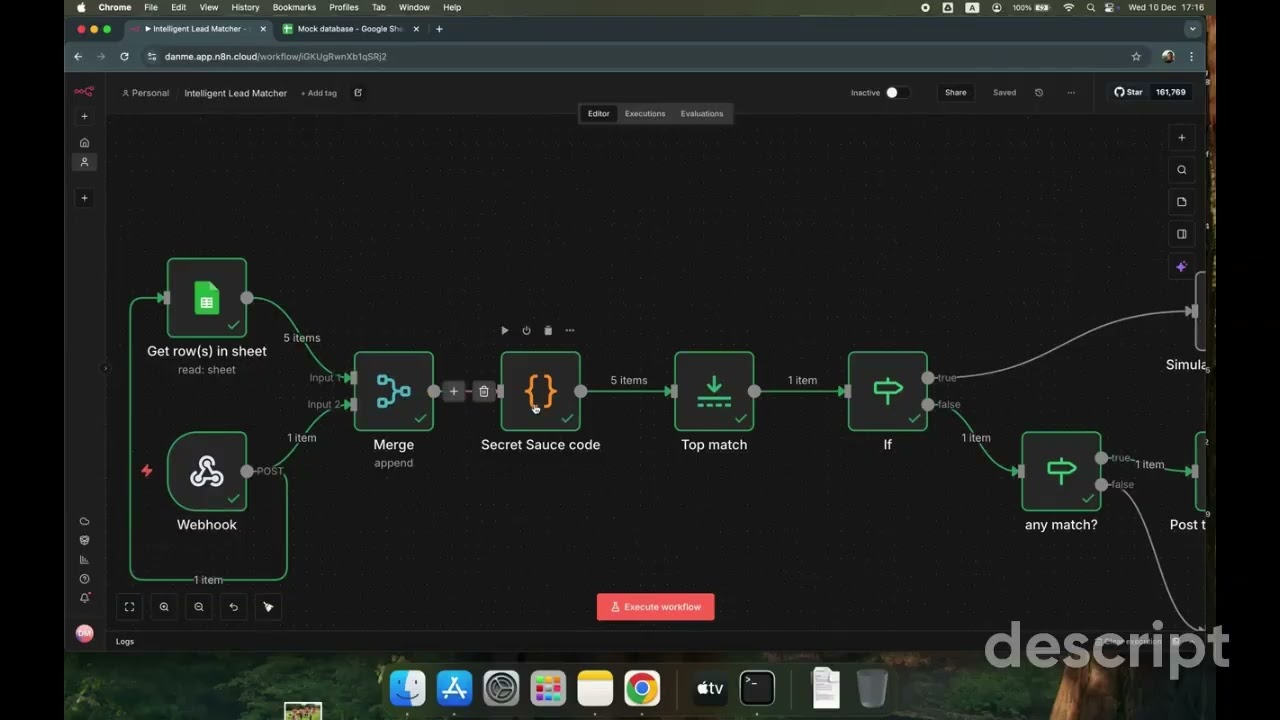
Build an intelligent intake system: when leads arrive from Google Sheets or Telegram (structured or unstructured), n8n normalizes the input with AI, runs smart matching against your existing CRM to catch duplicates, enriches only what’s missing with Lusha, then syncs the final record to HubSpot.
Why this works
Most CRM problems aren’t about enrichment or scoring. They’re about intake, and how raw, inconsistent inputs get handled before they become permanent records.
Teams already have enrichment. They already have automation. They even have deduplication rules. And still, the CRM slowly fills with near-duplicates, half-correct records, and contacts nobody trusts.
That happens because enrichment and cleanup are applied after the lead is already inside the CRM.
This play flips that logic. It treats lead intake as a system boundary, not a formality. This ensures only clean, validated, and matched data enters your CRM in the first place
What you get
A flexible intake engine that accepts leads from multiple sources (Sheets, Telegram, or any webhook), normalizes messy inputs into a standard structure, intelligently matches against existing HubSpot records to prevent duplicates, enriches conditionally (only what’s missing), and closes the loop with status updates and notifications.
How to set it up
Use the n8n template
Start from the “Sync and enrich HubSpot leads from Google Sheets and Telegram with Gemini and Lusha” template. It handles intake → normalization → matching → enrichment → CRM sync in one flow.
Connect all credentials
Authenticate in n8n:
- HubSpot
- Lusha API key
- Google Gemini
- Google Sheets
- Telegram bot
Configure your Google Sheet
Input your Spreadsheet ID in both:
- The Trigger node (listens for new rows)
- The Acknowledge node (updates status after processing)
Set up Telegram trigger
Configure the Telegram node to listen for messages in your designated lead channel or bot. Unstructured text messages will be parsed by Gemini.
Adjust matching sensitivity
In the Switch Logic node, set your fuzzy matching algorithm threshold:
- Default: 80% (recommended starting point)
- Higher (85–90%): Stricter matching, fewer false positives
- Lower (70–75%): Looser matching, catches more variants
This two-tier matching (hard + fuzzy) prevents duplicates and saves Lusha credits by avoiding unnecessary API calls.
Configure enrichment triggers
The workflow automatically calls Lusha’s Person and Company APIs only when key fields are missing—like email, role, or firmographic data.
This targeted approach keeps costs efficient at scale. You’re not enriching everything, every time, just filling gaps.
Test with both input types
Try sample inputs:
- Google Sheets: Add a row with name, company, email
- Telegram: Send “John Smith at Acme Corp, worth reaching out”
Confirm:
- Gemini normalizes Telegram text correctly
- Matching catches existing HubSpot contacts
- Enrichment runs only when needed
- HubSpot updates appear (create or update)
- Google Sheet status updates
- Telegram confirmation message sent
What to do next
- Add more intake sources: Extend the pattern to Cal.com bookings, Typeform submissions, or email forwards—same normalization logic applies.
- Tune matching thresholds: Adjust fuzzy matching algorithm dials based on your false positive/negative tolerance after observing real-world performance.
- Track intake metrics: Monitor processing speed, match rates, enrichment coverage, and duplicate prevention over time.
- Build source-specific routing: Send Telegram leads to SDRs instantly, Sheet leads to nurture sequences—based on urgency and source context.
- Layer in qualification scoring: After intake is clean, add AI scoring on top to prioritize high-fit leads automatically based on ICP criteria.
The goal: Clean CRMs aren’t the result of better cleanup jobs. They’re the result of better boundaries. Handle lead intake properly, and everything downstream becomes easier to reason about, easier to maintain, and easier to trust.
No FAQ items available at this time.
Ready to build this?
Get started with Lusha and set up this play in minutes.










