Sheets-first enrichment pipeline
Build an enrichment flow where a LinkedIn URL (or basic input) triggers n8n, Lusha’s API returns verified contact + company details, and the result lands back in your sheet and/or straight into your CRM.
Why this works
Most enrichment workflows aren’t slow because APIs are slow. They’re slow because people are doing all the manual labor: copy/paste, validate, format, upload, repeat.
A Sheets-first pipeline removes the busywork. One clean input becomes a repeatable trigger, and everything downstream gets structured data it can trust.
What you get
A system where:
- You add prospects to Google Sheets (manually or via list imports)
- n8n automatically enriches each row via Lusha
- Results populate back into the same sheet (and optionally your CRM)
- Your team works from one “source of truth” without chasing info across tabs
Google Sheets structure
Input columns (minimum)
- LinkedIn URL (preferred)
- First name (optional if URL exists)
- Last name (optional if URL exists)
- Company (optional helper)
Control columns (recommended)
- Status (New → Processing → Enriched → Failed)
- Last enriched at (timestamp)
- Error (if enrichment fails)
- CRM sync (Yes/No)
Output columns (what you write back)
- Full name
- Title
- Company name
- Company domain
- Work email
- Phone / direct dial
- Location
- Confidence / match notes (optional)
- Source (e.g., “Lusha API”)
Tip: Freeze the header row and use dropdowns for Status to keep the sheet clean.
How to set it up
Create your Google Sheet
- Add the input + control + output columns above
- Seed 3–5 test rows so you can validate the full loop
Set n8n to watch the sheet
- Use a Google Sheets trigger (new row / updated row)
- Only pick up rows where Status = New (so you don’t re-run everything)
Normalize the input
- If LinkedIn URL exists: use it as the primary identifier
- If not: fall back to name + company (but expect more ambiguity)
- Set Status = Processing when the workflow starts
Write results back to the same row
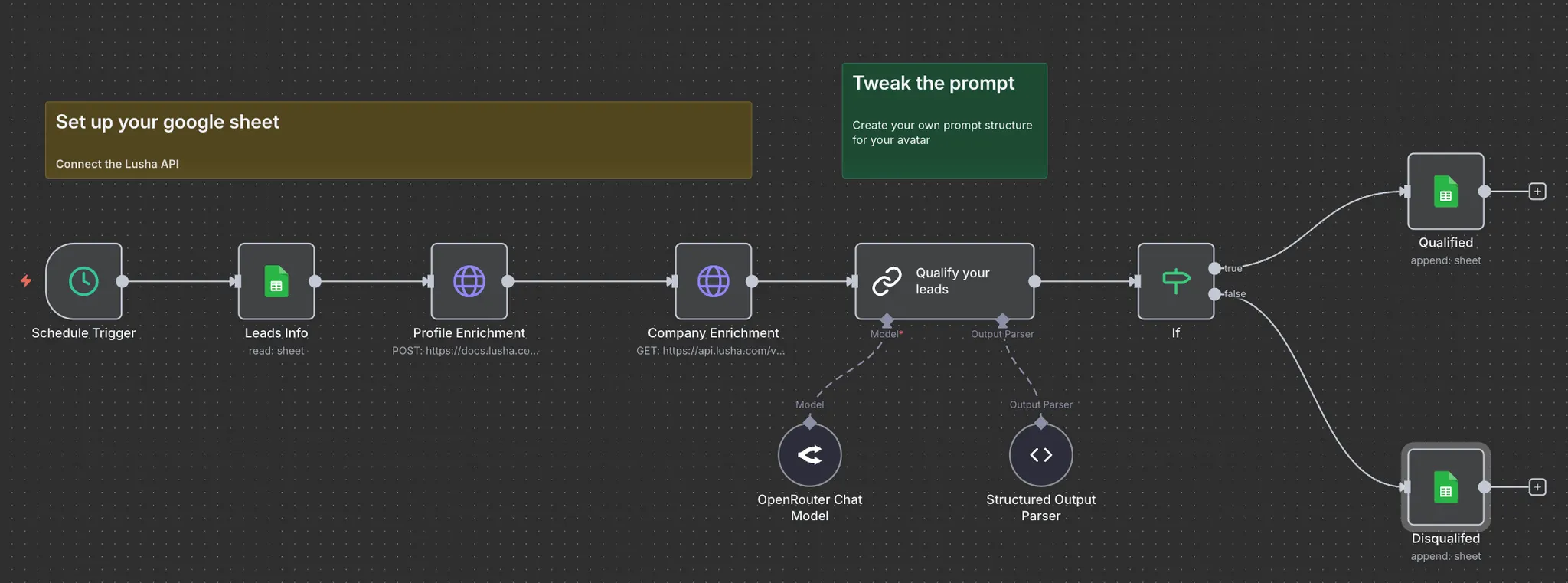
- Populate output columns (email, phone, title, company data)
- Set Status = Enriched
- Stamp Last enriched at
Optional — push to your CRM
- If CRM sync = Yes, create/update the Lead/Contact in HubSpot/Salesforce
- Write back the CRM record ID into the sheet (so you can track what synced)
Test with real-world edge cases
Use a few rows that usually break flows:
- Similar names (ambiguity)
- Private profiles / incomplete inputs
- Same person at different companies
What to do next
- Add dedupe logic (skip if email already exists in the sheet/CRM)
- Add routing (assign owner based on region/segment)
- Add alerts (Slack message when a high-value role is enriched)
- Add quality gates (only sync to CRM when key fields are present)
The goal: Sheets becomes your control center, and enrichment becomes infrastructure rather than a task.
No FAQ items available at this time.
Ready to build this?
Get started with Lusha and set up this play in minutes.










