Turn closed-won accounts into net-new pipeline
The strongest signal for future success is past success. However, most teams struggle to translate their best customers into a scalable list of new prospects. This play uses Lusha’s “Find Company Lookalikes” and “Find People Lookalikes” table source actions within Clay to automate this expansion.
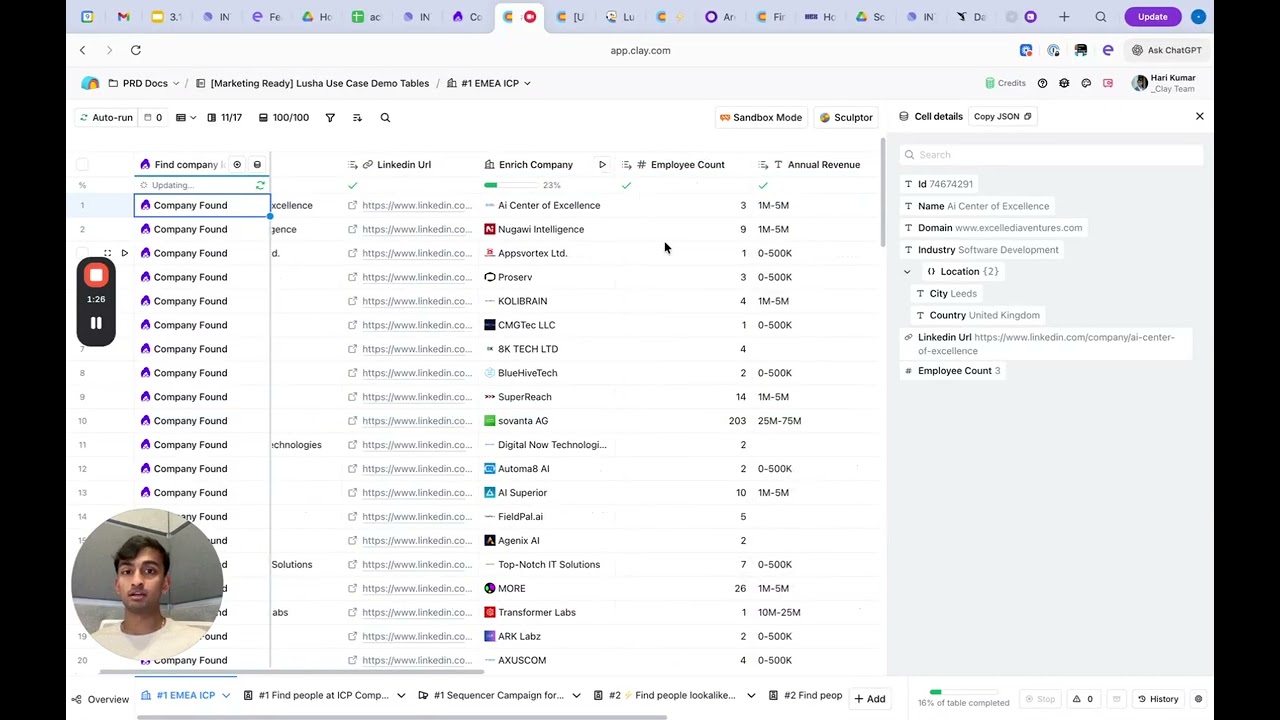
By feeding in 5–100 domains of your best customers, Lusha generates net-new rows of companies that share the same firmographic DNA (i.e. industry, revenue, and headcount). Unlike simple filtering, the lookalike algorithm finds non-obvious patterns in your successful accounts. Once the list is generated, Clay layers on enrichment and ICP scoring to ensure your reps only engage with the highest-probability opportunities.
Why this works
Static list building often results in spray and pray outreach. This play operationalizes your CRM’s winning signals by:
- Algorithmic discovery: Using Lusha’s proprietary logic to find hidden lookalikes that standard filters miss.
- Automated lead generation: Creating net-new rows in Clay rather than just enriching existing ones.
- Precision filtering: Using an exclusion list to ensure you don’t waste credits on existing customers or active opportunities.
- Ranked prioritization: Applying AI-driven ICP scoring so your team hits the perfect fits first.
What you get
- Net-new account lists based on your 5–100 best customers
- Net-new contact lists based on your top-converting champion profiles
- Full firmographic data (i.e. revenue, industry, and employee count)
- Verified contact details (i.e. emails and direct dials) for decision-makers
- A repeatable engine for scaling ABM campaigns based on proven success
How to set it up
Copy the Clay template
Copy the template into your Clay workspace.
Seed your search
Input your seed data to generate new rows.
- For accounts: Use 5–100 domains of your top-tier customers.
- For people: Use 5–100 LinkedIn URLs of your most successful champion buyers.
Tip: Add an “Exclusion List” of current customers to ensure you only generate net-new prospects.
Enrich the results
Use the Lusha “Enrich Company” or “Enrich Person” actions to fill in the blanks for the new rows. Map company domains to pull employee count, industry, and revenue.
Apply ICP scoring
Create a formula column or AI column to score the records. Set criteria based on your ideal fit (i.e. +5 points for “SaaS” industry, +3 points for “Series B” funding).
Identify decision-makers
For the high-scoring companies, use Clay’s “Find People” action to locate the right personas (i.e. VP of Product or Head of Engineering). Run the Lusha enrichment step to get their verified contact info.
Push to outreach
Filter for only those records that exceed your scoring threshold. Route them to your sequencer (i.e. Outreach or Clay’s native sequencer) for a personalized lookalike campaign.
What to do next
- Contextual outreach: Use a “Reason for Outreach” column in Clay to mention why they were targeted (i.e. “We’ve seen massive success helping companies like [Seed Company A] and [Seed Company B] in your industry…”).
- Tiered campaigns: Route high match lookalikes to a high-touch AE sequence and medium match lookalikes to an automated SDR sequence.
- Quarterly refresh: Run this play every quarter using your latest closed-won data to keep your pipeline consistently fueled by your most recent wins.
The goal: Stop hunting and start replicating. This play turns your CRM successes into a living, breathing prospecting engine that constantly finds the next best customer for your sales team.
No FAQ items available at this time.
Ready to build this?
Get started with Lusha and set up this play in minutes.










