Lusha is now an Enrich Data Partner on the Gong Collective. When a contact in Gong is missing an email or phone number, Gong Enrich can ask Lusha for it and fill the gap with a verified business email or direct dial, either from the contact view or as the contact is added to an Engage flow. Admins decide where Lusha sits in the email waterfall and the phone waterfall. Teams already on Lusha connect their own account and spend no Gong Credits. Teams that want to try Lusha first can reach it through Gong Credits with no separate contract. Gong Enrich is part of Gong Foundation and rolled out through September 2026. Open the Lusha listing on the Gong Collective.
Key takeaways
- Gong Enrich pulls missing or outdated emails and phones for contacts already in Gong, working through a waterfall of data partners that your admin puts in order. Lusha is one of the partners Gong supports.
- It runs two ways. A rep can enrich from a contact view, or Gong can enrich on its own when a contact is added to an Engage flow set up for it. Both use the same partners in the same order.
- You can pay two ways. Connect your existing Lusha account and no Gong Credits are used. Or reach Lusha through Gong Credits, which are charged only when Lusha returns data.
- Before it asks any partner, Gong checks that the contact still works at the account. Emails that fail validation are thrown out. A lookup that finds nothing costs nothing.
What is Gong Enrich, and where does Lusha fit?
Gong Enrich is Gong’s own enrichment layer. It is part of Gong Foundation and was released through September 2026. It retrieves missing or outdated email addresses and phone numbers for contacts in Gong from outside data partners, and it can also bring account and contact details such as industry, company information, title and LinkedIn data into Gong. For each type of data, the connected partners form a waterfall that Gong works through in order.
Gong launched Enrich with a short list of approved partners. The help center names six: LeadIQ, Wiza, RocketReach, Lusha, ZoomInfo and Findymail. The Collective’s Enrich Data Partners page shows seven, with ZeroBounce added for email validation. Lusha is the one on that list that also connects to Gong’s AI agents through MCP, which we cover further down.
What Lusha brings to Enrich is contact-level data: business email addresses and phone numbers. The figures behind them are 98% email accuracy and 85% US and 86% global phone accuracy, refreshed daily, with a published data decay study. The numbers and the method are on lusha.com/data.
Why does this matter for revenue teams?
Gong is where a lot of revenue teams spend their day. Calls, deals and outbound all run through it, and outbound runs through Engage. A flow is only as good as the contacts in it. A contact with no email cannot take the email step, and a contact with no direct dial cannot take the call step. Until now, filling that gap meant leaving Gong, finding the detail somewhere else, pasting it back and only then sending. With Lusha in the Enrich waterfall, the verified detail shows up where the rep already is, at the moment it is needed.
How does enrichment with Lusha work in Gong?
Three steps, each documented by Gong. First, before it asks any partner, Gong checks whether the contact is still associated with the company on their record, so you never pay to enrich someone who has already left. Second, Gong works through the partners in your waterfall in order. If a partner returns an email that fails validation, Gong discards it and moves to the next one. Third, the result is stored in Gong’s data model whether or not you have a CRM mapping, and it can sync back to your CRM.
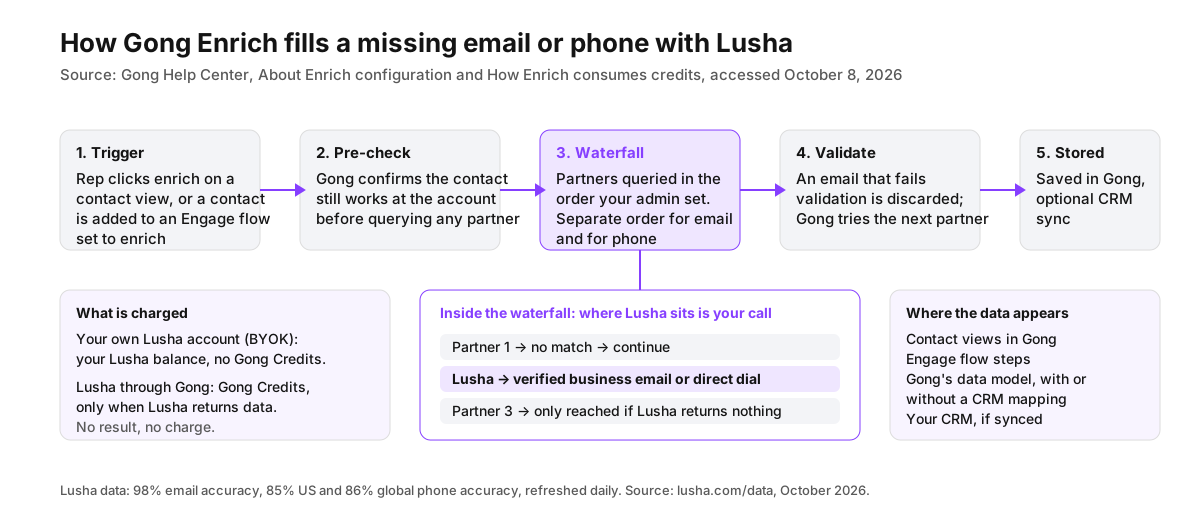
Enrichment can start in two ways. A rep clicks enrich on a supported contact view, or Gong enriches automatically when a contact is added to an Engage flow that your admin has configured for it. Both use the same partners in the same order. Enrich works in the background, so the rep keeps going while the data arrives.
What does it cost: your Lusha account or Gong Credits?
| Bring Your Own Key (BYOK) | Gong Credits | |
|---|---|---|
| Who it suits | Teams already on Lusha | Teams trying Lusha before they buy, or who want one Gong bill |
| What is charged | Your Lusha balance, at Lusha’s standard rates | Gong Credits, only when Lusha returns data, per data type returned |
| Gong Credits used | None | Yes |
| How to connect | Your Lusha credentials, in the Data partners tab | Enable Lusha as a Gong-provided partner |
| Can you mix the two | Yes. BYOK and Gong-provided partners can share a waterfall. Credits are used only for results from Gong-provided partners | |
| When nothing is returned | Nothing is charged. Account enrichment never uses Gong Credits | |
| When Gong Credits hit zero | Lusha enrichment carries on from your Lusha balance | Manual contact enrichment pauses until your Gong account team adds credits |
Source: Gong Help Center, How Enrich consumes credits, accessed October 8, 2026.
What can a team do with it on day one?
Fill the gaps before a flow goes out. You add 40 contacts from a target account to an Engage flow and a third of them have no phone. With automatic enrichment on, Gong asks Lusha as they are added, and the call steps have direct dials before the flow runs.
Enrich from a contact view. A new stakeholder turns up on a deal with only a name and a title. Click enrich. Gong confirms they are still at the company, runs the waterfall and comes back with a verified email.
Raise coverage without touching the process. RevOps already built an email waterfall. Add Lusha in the Data partners tab, set its position, and the contacts earlier partners could not fill get another verified source.
Try it on Gong Credits, scale it on Lusha. Enrich inside Gong on Gong Credits, read the match rates on the Enrich dashboard, then connect your own Lusha account once the numbers make the case.
How is this different from the Lusha AI Briefer in Gong?
Enrichment fills fields. The Lusha AI Briefer is a separate Gong Collective listing that connects Gong’s AI agents to Lusha through the Lusha MCP connection. When a rep opens an account, Gong’s Account Briefer can call Lusha’s tools directly for company and contact search, enrichment, lookalike companies and contacts, buying signals at company and contact level, and website visitor data. There are 18 tools in all. The Briefer draws on your Lusha balance at standard rates, and first-time setup needs a Gong Tech Admin who also has user or admin permissions in Lusha. See the Lusha AI Briefer listing. For the wider landscape, see which B2B data providers have an MCP server.
How do you set up Lusha in Gong Enrich?
- In Gong, open Settings and click Data enrichment in the Enrich card. On the Enrichment controls tab, switch Enrich on.
- On the Data partners tab, connect Lusha, either with your Lusha credentials for BYOK or as a Gong-provided partner to use Gong Credits.
- Still in Data partners, drag Lusha into place in the email waterfall and again in the phone waterfall. The two are ordered separately.
- If you want enriched contacts in your CRM, map the Enrich fields. They are stored in Gong either way.
- Run a test enrichment on one contact before you roll it out. A test through a Gong-provided partner uses Gong Credits.
From there, Lusha is available to your team from contact views and Engage flows. The full steps are in the Gong Help Center. Gong Enrich has to be enabled for your Gong account.
FAQ
What does Lusha add to Gong Enrich?
Verified business emails and phone numbers for contacts that are missing them, available from Gong contact views and when adding contacts to Engage flows.
Do I need a Lusha account to use Lusha in Gong?
No. You can connect an existing Lusha account (Bring Your Own Key) or reach Lusha through Gong Credits.
How are credits used?
With BYOK, results from Lusha come out of your Lusha balance at Lusha’s standard rates and use no Gong Credits. As a Gong-provided partner, Gong Credits are charged only when Lusha returns data, per data type. Lookups that find nothing are not charged, and account enrichment never uses credits.
Who can set this up?
A Gong admin, from the Data Enrichment page in Settings. Gong Enrich has to be enabled for your account.
Can I control when Gong uses Lusha?
Yes. Admins place Lusha in separate email and phone waterfalls and can add, remove or reorder partners whenever they like.
What happens if Lusha has no match for a contact?
Gong moves to the next partner in the waterfall. If no partner returns data, the rep sees a “no data found” message for that field and nothing is charged.
Is Gong Enrich the same as the Lusha AI Briefer?
No. Enrich fills missing emails and phones on contacts. The AI Briefer uses the Lusha MCP connection to give Gong’s AI agents account intelligence, buying signals and lookalikes for call prep, and it bills your Lusha balance.
Keep reading
- Real-time CRM enrichment for HubSpot and Salesforce
- Which tools help AI agents find verified emails?
- Best business data API for lead enrichment